MySQL and PHP Web Hosting

Martes, Mayo 22, 2012

Offline gps navigation software for android

OFFLINE GPS NAVIGATION FOR ANDROID w/ PH MAP

Onboard/Offline GPS Navigation App
»worldwide 2D/3D OSM maps
»turn-by-turn routing/navigation
»voice/audio guidance (>1.6)
»car/pedestrian routing (bike to come)
»local search (places/POI)
»visual/audio speed warning
»map themes (day/night/outdoor)
»frequent map updates
»no cellular network required
»no hidden roaming costs

Recently changed in this version:
- supports bicycle routing
- supports multiple text-to-speech engines
- map renders labels in right-to-left countries properly (e.g. Hebrew, Arabic)
- supports Japanese (user interface plus guidance)
- feedback form for "bad" routing results


Download Latest Version here!! Click Me!! map pico TTS included.

copy folder DATA to sdcard/navdroyd/ click ok on overwrite propmt

If error occurs upon installing try to uninstall old version of navdroyd and intall this one Click Here!!


Google Play Store (Android Market) v3.5.16

Google Play Store (Android Market) v3.5.16
Requirements: Android v2.2+
Overview: Play Anywhere, All your entertainment in one place, Google Play is your one-stop shop for all your favorite entertainment


ChangeLog:
- Play Store has becomes lot more faster than 3.5.15,
- Frequent force close errors for the users of Froyo 2.2 has been addressed,
- Works faster even on Slower data speeds,
- Slight UI changes in “My Apps” section
----You now have the Installed and All tabs you can swipe between. The former one is what we used to have before - it lists all apps installed on your device. The latter lists all apps you've ever installed in case you want to download them again or travel down the memory lane. This is quite handy, and I've seen this list before in the Play Store on the web, so it's great to get it here in the mobile app.
----The All tab contains a handy dropdown with all your accounts (if you added more than one) and lets you switch between them very easily (as opposed to clicking Menu, etc).
----A few of the stock apps that apparently never got linked to the Play Store before got identified and picked up this time, and updates.

Using this non-Mod:
- You cannot download/buy apps that are not available in your country. You can only view them in Google Play Store.
- You cannot download Paid apps for free.

For non-modded version:
1) Download the apk from the links
2) Put the apk on the phone ,don't use adb install *.apk in won't work it will say it already exists
3) Open the apk from the phone using a File explorer (e.g. ES File Explorer/Root explorer)
4) it will ask you if you want to replace the current market,press yes.
5) Wait for install and voila you have the new market

NOTE:this method replaces the old market.


Mod version features:- Unlimited access to apps in Google Play Store
- Removed countries restriction in Google Play Store
- Fixed the issue which your device is not compatible with this item in Google Play Store

You can only replace the current market apk for the original non-modded version.
You will require ROOT if you want to install the Modded version!

For Modded version:
1) ROOT is REQUIRED! If you haven't rooted you phone then shoot yourself already!
2) You will need to Download 'Root Explorer' and mount as 'R/W' or any file browser that can access /root folder if you don't already have it installed.
3) Go to '/system/app/' and backup the 'Vending.apk' (Gingerbread) or 'Phonesky.apk' (ICS) to your SD Card (leave the Vending.odex untouched!).
4) Check if you have either 'Vending.apk' or 'Phonesky.apk' and delete it.
5) Now, Move the modded apk that you have downloaded to '/system/app/' and rename it the same as your backup version.
6) Change the Permission to 'rw-r--r--'
7) NOW, Reboot your phone!
8) Finito!


Download Link:

For non Modded:

For Modded:

Sabado, Mayo 19, 2012

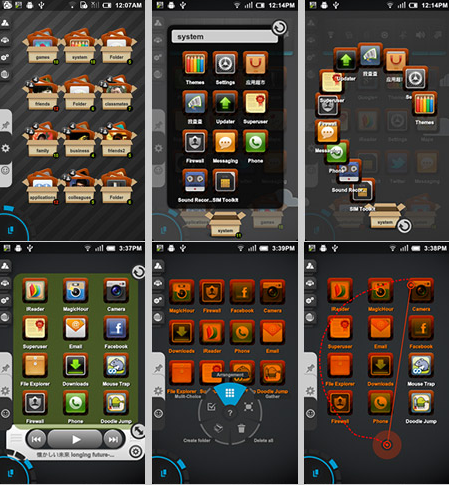
TSF Shell Pro Launcher - The Best Launcher has finally Arrived

Guys finally I have hands on this wonder application which can be customized a big part of our interface.


View the demonstration Video here:

Latest Version v1.4.0
Download Here: TSF V1.4.0


Just Explore the Shell and Enjoy as always Thanks!!!

Swapper2 (Root users) for low ram

Next version of Swapper. Android version 1.6
and up.
Needs root and kernel swap support.
May degrade SD card life.
Ads supported.
News (0.2.8r2):
* Fighting FCs on some devices.
Old versions available at http://swapper.n3o.lv

Requirements:
-Custom roms-
-300+ sdcard space-
-Terminal Emulator-


Start:
1.Download Swapper2 then install.


2.go to terminal emulator. type free your must be zro (0)

3. open swapper2 go to Setting, Swap size=256 MB, Swappiness= 100.
Advanced preferences check "Recreate swap file" and Reformal swap" then exit.


4. Open Swapper2 click ON if it fails click on again. wait 3-4 minutes. until done.

5. again go to terminal emulator type free or the zero (0) it will be change to "262136"

6. using file manager or root explorer check for file named swapfile.swp


Enjoy your Fully Partitioned unit.. this tutorial is applicable to those phone with low ram. enjoy!!!!

Biyernes, Mayo 18, 2012

Android Windows 7 Look

install and restart no need for root.