MySQL and PHP Web Hosting
Ipinapakita ang mga post na may etiketa na Applications. Ipakita ang lahat ng mga post

Sabado, Hunyo 23, 2012

Advertise here.

Hi there. I am looking for interested advertiser here in my little blog. i have a little decent topic that can probably be big when i can have my own domain to use of. I'm just offering my service to review your mobile products. i can give you real up time review within your product. i only charge for advertisements for only 50$ for one month the ads space in the header which in the size of 900px x 90px. 50$ a month is really our offer. plus with that 50$ i will review your item and tweet any updates for it. thanks and more power to all of you god bless.

you can reach me trough email s60master@gmail.com
i accept payment trough Libertyreserve.com email me first before proceeding to the transaction.

Lunes, Hunyo 4, 2012

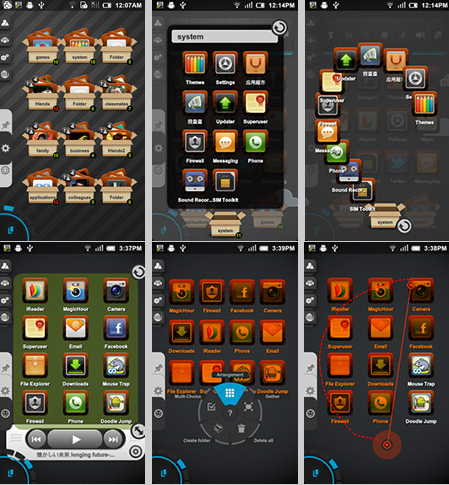
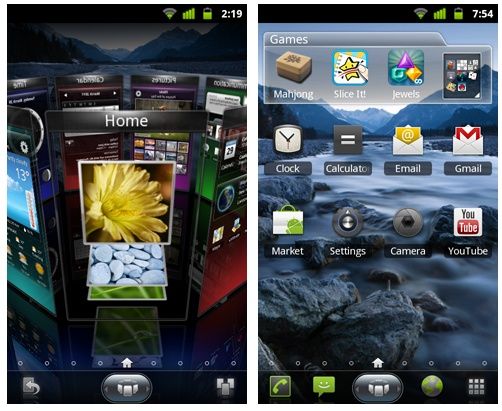
HOT Trending SPB Shell 3D


SPB Shell 3D: next generation user interface. Enjoy your phone!


SPB Shell 3D Reviews:
"Butter-like smoothness" - Engadget
"As useful as it is gorgeous" - ZDNet
"Absolute Must-Have for every Android user!" - Gizmodo
"Looks Incredible And Runs Smoothly" - LAPTOP Magazine


To launch SPB Shell 3D press the Home button once installation is completed.


Features:
3D Home screen/launcher
Smart folders
3D widgets
Collection of panels and widgets

Installation guide (youe device must be rooted.)


1. Download SPB shell 3d v1.5.2.apk and spbshellpatcher.apk

2. Install first SPB shell 3d v1.5.2.apk then install spbshellpatcher.apk

3. After installation open spb shell patcher then click on patch, wait till your application is patched.

4. Click on your home button and select spb shell.

5. You are done my friend enjoy your new home launcher.


Note:
If in case app did not work try restarting your device.
Tried and tested on SGY and LG p500.


Download Links:


SPB shell 3D v1.5.2


SPB shell patcher

Biyernes, Hunyo 1, 2012

Skype free video calling v2.8.0.920


Skype - free video calling v2.8.0.920 Modded v16
Requirements: Android 2.1+


Skype 2.5 for Android lets you make free voice and video Skype-to-Skype calls, and call phones and landlines at great Skype rates on the move.
Video calling now supported on more Android phones.

Features:
Free* Skype-to-Skype IM, calls and video calls over 3G or WiFi.
Cheap calls and SMS to landlines or mobiles at great Skype rates

Some notes:
If you're using Android 2.2 (Froyo) or greater on a device not listed in the What's New section, you should still be able to enable video calling in Skype settings. Please note that video call quality may not be as good as on a certified device.
On Android 2.2 (Froyo), only the back camera will work. This is because only devices running Android OS 2.3 or higher allow apps to access the front facing camera.
If the setting to enable video calling is not available in the Skype Settings on your device that means video calling is not yet supported on your phone.
--
* Data plan or WiFi connection required

You need Android v2.2 to run Skype on a Samsung Galaxy S
Please sign out of Skype to close the application.
(These handsets already support video calling)
Samsung Nexus S
Samsung Galaxy S 4G
Samsung Galaxy S
Samsung Galaxy S Fascinate
Samsung Droid Charge
Samsung Galaxy S II
Samsung Galaxy Tab 7 WIFI
Samsung Galaxy Tab 7 Verizon
Samsung Galaxy Tab 7 Sprint
Samsung Galaxy Tab 7 Plus
HTC Desire
HTC Desire S
HTC Incredible S
HTC Desire HD
HTC EVO 4G
HTC EVO 3D
HTC Sensation 4G
HTC Thunderbolt
HTC Flyer
Sony Ericsson Xperia neO
Sony Ericsson Xperia PrO
Sony Ericsson Xperia Play (Rest of world)
Sony Ericsson Xperia Play (China)
Sony Ericsson Xperia Ray
Sony Ericsson Xperia Mini Pro2
LG Revolution

The following devices have also been white-listed for video calling in this release:
Samsung Galaxy Tab 10.1 (T-Mobile)
HTC SHOOTER (KDDI)
Sony Ericsson Xperia Live with Walkman
Sony Ericsson Xperia neo V
Acer Iconia Tablet (A500)
LG Optimus Black LANDSCAPE ONLY
LG Optimus 3D LANDSCAPE ONLY
LG Optimus 2x LANDSCAPE ONLY
Motorola Photon
Motorola Droid3 LANDSCAPE ONLY
Motorola Bionic LANDSCAPE ONLY
Motorola Xoom
Motorola Atrix

What's in this version:
What's new in the hotfix:
Fix for start-up issues on Android 2.1
Fix for occasional white screen
Fix for video orientation on Galaxy Nexus
Other bug fixes
What's new in this version?
• Send pictures, videos and files
• Easier to sign out, and auto-sign in
• Improved look and feel with new graphics
• Voicemail improvements
• Better video quality on Tegra 2 devices

Changes compared to original Skype:
• Exit button (kills app & service)
• Colorful notification bar status icons
• Minor fixes for vibration
• Speaker toggle while in call (just press your phone's MENU button)
• Bluetooth audio toggle while in call (just press your phone's MENU button), uses *my* code for BT Audio, so you can try it for mono headsets or headsets that don't work with Skype's original BT support
• Camera LED/flash support while in video-call (just press your phone's MENU button)
• Advanced Settings:
→ Keep screen alive, disables proximity sensor for calls
→ Force-enable video-calling, for phones that can't get video-calling enabled.
*Video-calling needs compatible CPU (ARMv7). If your phone's CPU is not compatible, Skype will keep crashing/looping at login!*
→ Force enable camera rotation, will attempt to enable camera rotate option (under the camera selection popup)
→ Avoid setFPS, for some users that get black image in video-calls
→ Prefer full-screen incoming video, won't allow your back camera image to take the whole screen leaving the incoming image minimized
→ Force notification LED/BLN, for users that "Pulse notification light" option (in Skype original settings) doesn't actually enable notification LEDs or BLN!
→ Advanced camera settings (focus/scene/white balance/color effect)
→ Ringtone picker!
→ Notification sound picker!
→ Disable vibration entirely (or sign-in/out vibration & sounds)
→ Vibration patterns picker!
→ Verbose logging, use it for debugging, when capturing logs


Play Store link: Click Here..


Media Fire link: Click Here.

after focus 1.1.0


AfterFocus 1.1.0
(updated May 3, 2012 Pro Version)
REQUIRES ANDROID:
2.0 and up


Description:


AfterFocus combines the best of having a point-and-shoot c
amera and a DSLR camera bundled into one fantastic
application. Bring a DSLR-like camera wherever you go as
AfterFocus will use everything in its arsenal to transform y
our Android smartphone into a DSLR camera.

With AfterFocus, users can create DSLR-style high
resolution backgrounds by simply selecting the area you
wish to be edited. You can also apply various filter effects
to create a more natural, realistic-looking photo.

AfterFocus relies heavily on the user’s selection, in which the
app automatically recognizes the shaded part and
applies the corresponding effect with the corresponding complex
shades and colors.
The app also allows a Double Photo feature that takes a picture of
one object and slightly takes another
shot of the same picture, after which it will analyze the images
and recognize the nearest object. You can also share your
photos via email or social networking sites easily,
straight from the app itself.


Market Link: Click me 

Media Fire link: click here..

Biyernes, Mayo 25, 2012

TubeMate Download Your Favorite Youtube Vid.


TubeMate YouTube Downloader enables you to quickly access, search, share, and download YouTube videos. Because downloading always happens in the background, you can go on watching YouTube, surfing the Internet, tweeting, and listening to your music as you download.

* Fast download mode(with multiple connections for a download)
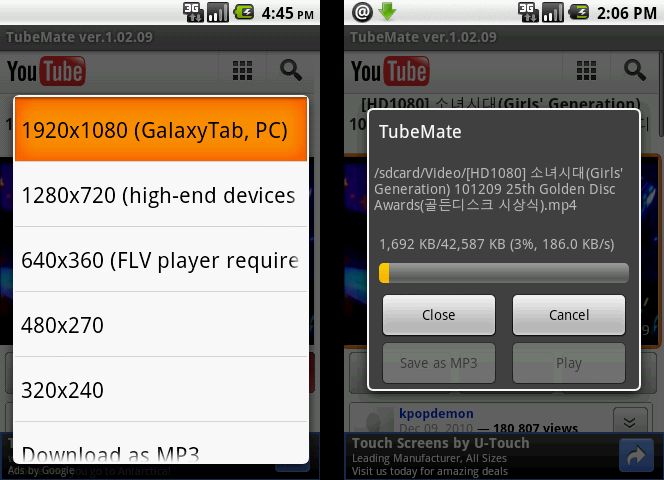
* Multiple download resolution options
* Background, multi-download
* Resume downloading
* Convert to MP3 (powered by MP3 Media Converter)
* Playlist as video/audio(powered by Meridian Player)
* Share your video finds via Google Buzz, Twitter or e-mail at the tap of a button
* YouTube search and related videos suggestions
* Save favorite videos to your YouTube account, create playlists
[Available resolutions]
1920x1080(Full-HD): GalaxyTab, Galaxy S2, PC
1280x720(HD): high-end devices
640x360: general devices
320x240: low-end devices
640x360, 854x480(FLV) : Android 2.1 and over
(the available options depend on the quality of the uploaded video and your device)

Special Thanks to Translation volunteers:

HendriX(Italiano), Ainomx(Spanish), Szymon(Polish), s_h(Hebrew), nivp(Hebrew), Tobias(German), Educolnago(Portuguese-Brazil), Jano(Czech, Slovak), Roan67(French), Gadrinium(Japanese), Rob(Dutch), Adigehalil(Turkish), Mobde3(Arabic), Olina(Chinese), Per(Danish), Dennis(Dutch), Marcio(Portuguese), William(Swedish), Fedor(Czech, Slovak) Horvath(Hungarian), Suurmeijer(Dutch), Techiebird(English)

KW: TubeMate, YOUTUBE DOWNLOADER, TUBEX, JetVD, Freedi, YouTube Music Video, TubeMate, YouTube MP3 Converter, YouTube Video Downloader, TubeMate, YOUTUBE DOWNLOADER, TUBEX, JetVD, Freedi, YouTube Music Video, TubeMate, YouTube MP3 Converter, YouTube Video Downloader, TubeMate, YOUTUBE DOWNLOADER, TUBEX, JetVD, Freedi, YouTube Music Video, TubeMate, YouTube MP3 Converter, YouTube Video Downloader, TubeMate, YOUTUBE DOWNLOADER, TUBEX, JetVD, Freedi, YouTube Music Video, TubeMate, YouTube MP3 Converter, YouTube Video Downloader


Martes, Mayo 22, 2012

ADW Launcher 1.3.6 Standalone

ADW Launcher 1.3.6 Standalone

Description:
ADW.Launcher, beyond tweaking your android desktop

Opensource home replacement app
-Customizable application drawer (old one or iphone/galaxy one)
-Customizable drag&drop action buttons
-Unveil the Dockbar flicking-up the app-drawer button and drop UNLIMITED shortcuts/folders!
-Themes

Tips:
-Read the changelogs and the application blog.
-To change your screen configuration, press Menu/Edit while at the desktop
-To create your own app drawer launcher button just press Menu/Add/Launcher Actions/Open app drawer
-Be polite, this is a free app :-)

What's in this version:
1. 1.3.6
2. New option to lock/unlock desktop (menu/more/lock-unlock)
3. Fixes some FCs
4. 1.3.5
5. New option to choose the trash can position
6. Quick actions for desktop items.
7. Added Launcher Actions to main ADD menu
8. New option to choose if the app drawer remains open when longpressing icons while the dockbar is open.
9. Items can now be draged out from the action buttons or edited by the quickactions


Screenies:


Adobe Flash Player 11 for Samsung Galaxy Y (ARMv6)

Hi guys I will share a lil bit of sweet in our blog. want to watch youtube videos directly with your Android phone? heres how.

in this Application Flash player 11 we will have an UC browser as our main one watch the video to learn how then the download link to follow.


then follow all the instruction then voila!!! you have your way to play some Flash games and Youtube.

Download Links:

UC Browser DL here!!!

Adobe Flash Player 11 Click here!!

Offline gps navigation software for android

OFFLINE GPS NAVIGATION FOR ANDROID w/ PH MAP

Onboard/Offline GPS Navigation App
»worldwide 2D/3D OSM maps
»turn-by-turn routing/navigation
»voice/audio guidance (>1.6)
»car/pedestrian routing (bike to come)
»local search (places/POI)
»visual/audio speed warning
»map themes (day/night/outdoor)
»frequent map updates
»no cellular network required
»no hidden roaming costs

Recently changed in this version:
- supports bicycle routing
- supports multiple text-to-speech engines
- map renders labels in right-to-left countries properly (e.g. Hebrew, Arabic)
- supports Japanese (user interface plus guidance)
- feedback form for "bad" routing results


Download Latest Version here!! Click Me!! map pico TTS included.

copy folder DATA to sdcard/navdroyd/ click ok on overwrite propmt

If error occurs upon installing try to uninstall old version of navdroyd and intall this one Click Here!!


Google Play Store (Android Market) v3.5.16

Google Play Store (Android Market) v3.5.16
Requirements: Android v2.2+
Overview: Play Anywhere, All your entertainment in one place, Google Play is your one-stop shop for all your favorite entertainment


ChangeLog:
- Play Store has becomes lot more faster than 3.5.15,
- Frequent force close errors for the users of Froyo 2.2 has been addressed,
- Works faster even on Slower data speeds,
- Slight UI changes in “My Apps” section
----You now have the Installed and All tabs you can swipe between. The former one is what we used to have before - it lists all apps installed on your device. The latter lists all apps you've ever installed in case you want to download them again or travel down the memory lane. This is quite handy, and I've seen this list before in the Play Store on the web, so it's great to get it here in the mobile app.
----The All tab contains a handy dropdown with all your accounts (if you added more than one) and lets you switch between them very easily (as opposed to clicking Menu, etc).
----A few of the stock apps that apparently never got linked to the Play Store before got identified and picked up this time, and updates.

Using this non-Mod:
- You cannot download/buy apps that are not available in your country. You can only view them in Google Play Store.
- You cannot download Paid apps for free.

For non-modded version:
1) Download the apk from the links
2) Put the apk on the phone ,don't use adb install *.apk in won't work it will say it already exists
3) Open the apk from the phone using a File explorer (e.g. ES File Explorer/Root explorer)
4) it will ask you if you want to replace the current market,press yes.
5) Wait for install and voila you have the new market

NOTE:this method replaces the old market.


Mod version features:- Unlimited access to apps in Google Play Store
- Removed countries restriction in Google Play Store
- Fixed the issue which your device is not compatible with this item in Google Play Store

You can only replace the current market apk for the original non-modded version.
You will require ROOT if you want to install the Modded version!

For Modded version:
1) ROOT is REQUIRED! If you haven't rooted you phone then shoot yourself already!
2) You will need to Download 'Root Explorer' and mount as 'R/W' or any file browser that can access /root folder if you don't already have it installed.
3) Go to '/system/app/' and backup the 'Vending.apk' (Gingerbread) or 'Phonesky.apk' (ICS) to your SD Card (leave the Vending.odex untouched!).
4) Check if you have either 'Vending.apk' or 'Phonesky.apk' and delete it.
5) Now, Move the modded apk that you have downloaded to '/system/app/' and rename it the same as your backup version.
6) Change the Permission to 'rw-r--r--'
7) NOW, Reboot your phone!
8) Finito!


Download Link:

For non Modded:

For Modded:

Sabado, Mayo 19, 2012

TSF Shell Pro Launcher - The Best Launcher has finally Arrived

Guys finally I have hands on this wonder application which can be customized a big part of our interface.


View the demonstration Video here:

Latest Version v1.4.0
Download Here: TSF V1.4.0


Just Explore the Shell and Enjoy as always Thanks!!!

Swapper2 (Root users) for low ram

Next version of Swapper. Android version 1.6
and up.
Needs root and kernel swap support.
May degrade SD card life.
Ads supported.
News (0.2.8r2):
* Fighting FCs on some devices.
Old versions available at http://swapper.n3o.lv

Requirements:
-Custom roms-
-300+ sdcard space-
-Terminal Emulator-


Start:
1.Download Swapper2 then install.


2.go to terminal emulator. type free your must be zro (0)

3. open swapper2 go to Setting, Swap size=256 MB, Swappiness= 100.
Advanced preferences check "Recreate swap file" and Reformal swap" then exit.


4. Open Swapper2 click ON if it fails click on again. wait 3-4 minutes. until done.

5. again go to terminal emulator type free or the zero (0) it will be change to "262136"

6. using file manager or root explorer check for file named swapfile.swp


Enjoy your Fully Partitioned unit.. this tutorial is applicable to those phone with low ram. enjoy!!!!

Biyernes, Mayo 18, 2012

Android Windows 7 Look

install and restart no need for root.

Linggo, Mayo 13, 2012

Hide It Pro

Hide It Pro! Be the master of you own privacy.
Hide the Pictures/Videos you don't want anyone to see.
Hide Pictures and Videos in your phone. COMPLETELY FREE and UNLIMITED version. Only app in android market having full 5 stars rating with 1,000,000 downloads
Like us ? Hit the +1 button. Hide it Pro is the best app to hide pictures and videos in your phone.
The app is cleverly disguised as "Audio Manager" in the App Drawer.
Hide the Pictures/Videos/Audio Files and Even Entire applications that you don't want anyone to see.
Features built in video player , gallery , password protection and lots more.
Disguises itself as a Audio Manager app which can be used to turn the volumes up and down. but if you Long press on the Audio Manager title the actual Hide It Pro app will launch.
You can hide Images/Videos/Audio Recordings etc. from the Phone's stock gallery by selecting all the pics that you want to hide and selecting SHARE. Applications can be hidden from within the Hide it Pro app.


Features :

0.) App disguised behind a fully functional Audio Manager
1.) Super clean and smooth UI.
2.) Proper segregation of videos/pictures audio with dashboard
3.) Categorize media into folders of your choice
4.) Batch(Multi-Select) support for hiding and unhiding files
5.) Unhide entire folders, or select multiple files to unhide at once
6.) Move files between folders
7.) Sort files by date/size/name and sort folders by count/name
8.) Thumbnails for pictures and videos on all devices
9.) Gallery features Pinch to Zoom , Double tap to zoom , One finger hold and move zoom
10.) Slideshow with Fade and Zoom effects
11.) Send/Share pictures , Get picture details and other miscellaneous options
12.) Image for seamless browsing
13.) Special optimization for low end phones. (uncheck the low memory mod from settings to get crisper pics back)
14.) Video player features play/pause/forward/rewind/next video/prev video support
15.) Ability to choose and save custom video player
16.) Disappears from recent apps list
17.) Two lock screen options viz Pin and Password
18.) Escape pin/password for times when you get caught
19.) Has built in full featured file manager with ability to hide/move/share/delete multiple files
20.) Built in encryption tool(with military standard 256-bit AES encryption) to secure your most important files
21.) Special support for Incognito Browser(vBrowser) with hidden bookmarks ,and special ability like downloading from 14+ video streaming websites
22.) Full Support for Locking apps from within the app.
etc.

There are a lot more features like custom slideshow durations/slideshow order/effects , custom folder thumbnails etc. but i'll leave some of the secrets of the app to be discovered by the users


VPlayer (Unlocked) v.1.3.2

VPlayer (unlocked) V. 1.3.2


Requirements: Android 2.1+
Overview: VPlayer is next generation of VPlayer, which brings experimental HW accelerated decoding and rendering to HD MKV/AVI/MOV/FLV/TS/M4V/3GP for most Android devices. Also a new designed UI is available now, and of course, a new icon
.


VPlayer is a HW accelerated Media player for android. It use HW video decoder at various containers and audio codecs combination.
Dual Core/High end devices ( Sensation , Galaxy S/S2 , Nexus-S ) can play 720p even 1080p MKV/AVI/MOV/FLV/TS/M4V/3GP.

VPlayer drains less bettery than SW based players such as MX Video Player, MoboPlayer.

ICS devices can play 1080p files with full HW accelerations, Honeycomb tablets can play 720p MKV with Full HW accelerations.

If you use MIUI, CM7 or unofficial ROMs that can not play MKV/FLV/MOV/AVI using default player, VPlayer is the best solution.

Features

Formats
- AVI,MOV,MKV,FLV,AVI,3GP,3G2,ASF,WMV,MP4,M4V,TP,TS, MTP,M2T
Video Codecs
- HW : MPEG-4,H.264,H.263
- SW : MPEG-4,H.264,RMVB,XVID,MS MPEG-4,VP6,H.263,MPEG-1,MPEG-2
Audio Codecs
- DTS,AC3,AAC,Vorbis,FLAC,MP3,MP2,WMA
- Mutitle audtio tracks support

Subtitle
- (Advanced) SubStation Alpha(.ssa/.ass), SAMI(.smi), SubViewer(.sub), Subrip(.srt), MicroDVD(.sub), MPL2(.txt)
- MKV subtitle extraction supported
- Unicode/Multibyte charset supported.
- Mutiple subtitle tracks support
- Increased subtitle readability with thicker border and shadow around text.

Transport
- HTTP
- RTP/RTSP/RTMP
- MMS
- HTTP Live Streaming with multiple bitrate

Supported devices
* ICS devices, Galaxy Nexus, Nexus S
* Honeycomb tables(TF101,GT10.1,Iconia500) : 720p High@4.1 ( no weighted prediction )
* Samsung Galaxy S2 : 1080p H.264 high@5.1/MPEG-4,1080i AVCHD MTS
* Samsung Nexus S, Galaxy S and variants : 720p H.264 High@5.1
* Samsung Galaxy Tab(7') : 1080p H.264 High@5.1. 1080i have interlace artifacts.
* Samsung Galaxy Note : 1080p H.264 High@5.1
* HTC Desire HD,ThunderBolt : 720p High@3.1/4.0(some Level 4.0 file have shutter problem)
* HTC Desire and QSD8250 baesd devices : 720p H.264 High@3.
* HTC Evo 3D : 720p High@5.1/1080p High@5.1(some 1080p files have shuttering)
* Dell Streak,Venue : 720p H.264 High@3.1
* HTC wildfire: video capability depends on your firmware.
* Moto Atrix: 720p High@5.1
* Xiao mi: 720p High@4.1

More devices are supporting...

Limitations
* Video capability depends on your devices HW video decodes' capability.
* Some devices(Moto Defy, Galaxy S/Tab) need gingerbread update.
* Tegra 2 based devices : H.264 High@4.1 ( no weighted prediction )

What's in this version:

1. Fix a serious bug of deleting video files. Sorry for the inconvenience.
2. Translation for Russian, thanks to Наиль Шайхутдинов(symbdroid@gmail.com).
3. Stop all services when quit VPlayer from menu.
4. Add a simple lock screen feature.
5. Some UI tweaks.
6. Add some useful tips of VPlayer.


Download Vplayer Here>> Click Me!!!
Download Vplayer Codecs Here>> Click Me!!!
Download Vplayer Unlocker Here>> Click Me!!!

Download Movies Here>> moviesmobile.net avi HD vids

[HOT] Torrent Downloader

aTorrent PRO 1.6.4 Android-P2P For your Android Devices


“aTorrent PRO” for your Android Devices. aTorrent PRO – Native P2P BitTorrent Software for Android devices.Download files with ease right to your phone or tablet! aTorrent – Bit Torrent Software. Download big files right to your pad or phone! aTorrent PRO – Native P2P BitTorrent Software for Android devices. Download files with ease right to your phone or tablet!


aTorrent PRO 1.6.4 Android-P2P

Features:
Torrent search dialog
Open torrents right from browser
Magnet links support
Add torrent from file
Choose download folder
Partial download (choose files from torrent)
Multiple parallel downloading
Option to limit downloads by Wi-Fi
Option to pause downloads when external power supply is not connected
Supported protocols: BitTorrent P2P, DHT, Advanced DHT Bootstrap, Magnet links, HTTP & UDP Trackers